
Subscriptions
Per-seat plans across coding assistants, IDEs, and team tools.
For B2B software teams operating a fragmented AI stack
Knotic connects tokens, estimated cost, latency, provider, model, tools, and context to the individual call and the workflow it belongs to.
Provider dashboards show invoices. Workflow visibility helps Engineering understand what created the spend.
HQ Monitoring
Workflow cost explorer
Workflow
Checkout validation
Calls
3
Estimated cost
$0.24
Call 03 · Retry
Repair checkout validation
14 files · repository memory · 2 tool results
Retry linked to the same workflow intent
Call 01
Provider B · Standard model · $0.04
Call 02
Provider A · Premium model · $0.08
The real operating cost
As adoption spreads, AI coding spend becomes a system of subscriptions, inference, credentials, routing decisions, and repeated work.
Per-seat plans across coding assistants, IDEs, and team tools.
Usage-based inference billed separately by one or more providers.
BYOK, centrally managed credentials, and keys held by individual developers.
Routine work gradually routed to higher-cost models without an explicit policy.
Repeated calls after failures, weak outputs, or incomplete context.
Files, tool results, and repository knowledge included beyond what the task needs.
Overlapping products and licenses solving the same workflow across the team.
Provider invoice vs workflow visibility
Provider billing views and workflow telemetry solve different questions. The goal is not to replace vendor invoices, but to connect aggregated spend back to engineering activity.
Provider view
Workflow view
Exact fields depend on the instrumentation, provider, and workflow configuration available to the team.
The central mechanism
Review AI coding activity at the level where teams can act: the call, the workflow, the provider decision, and the context that shaped the request.
Explore HQ MonitoringThe request inside the engineering workflow.
Where the request was routed and which model handled it.
Usage and estimated cost connected to that specific call.
How long the flow took and where work repeated.
Which tools, files, and context contributed to the payload.
Prevent cost before the call
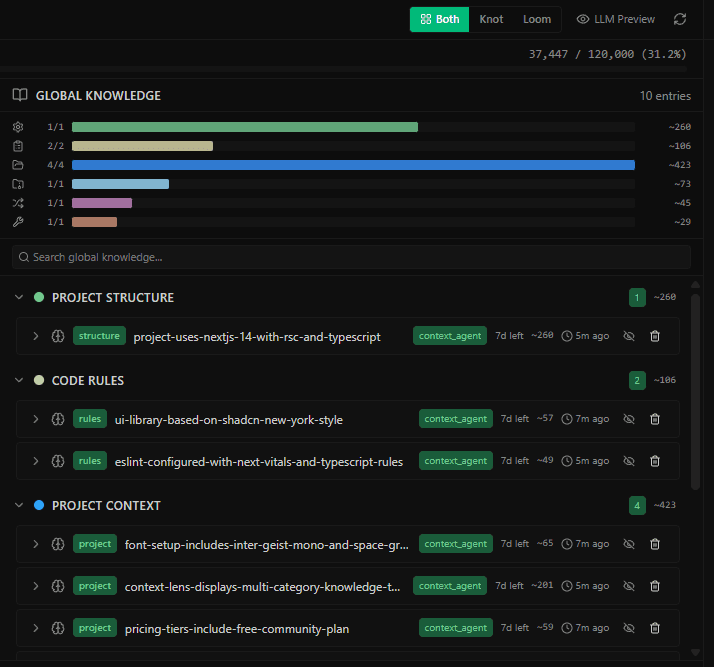
Context Lens exposes the payload and token budget before send. Developers can inspect files, memory, and other context blocks while there is still time to trim what the task does not need.
AI Coding Cost & Provider Audit Sheet
Use one shared view to map licenses, API consumption, keys, workflow ownership, and the visibility gaps that make monthly spend difficult to explain.
Request the audit sheetThe sheet is provided on request. This page does not link to a placeholder download.
Audit structure
One row per tool or provider setup
What to measure first
Establish a baseline from your own workflows. No external benchmark is required to find routing, retry, or context decisions worth reviewing.
Group calls around a real engineering outcome, then review the provider, model, and repeated work behind it.
Which workflows consume the most, and who owns the decision?
Inspect the input context attached to each request, including files, memory, and tool output.
Is every context block relevant to the task?
Track when a workflow repeats because of an error, incomplete answer, or avoidable context gap.
Where does the team pay twice for the same intent?
Review which providers and model tiers handle each category of engineering work.
Is routing deliberate, or simply the default?
Evaluation questions
No. Provider billing views remain useful for invoices and vendor-level consumption. Knotic HQ Monitoring adds the engineering workflow layer by connecting a call to its provider, model, tokens, latency, tools, context, and estimated cost.
Yes. Knotic supports multi-provider workflows so teams can make provider and model choices visible in one operating surface. The available configuration depends on the providers and models your team enables.
Context Lens helps teams inspect and trim noisy or irrelevant context before a request is sent. That can reduce unnecessary token consumption, but the outcome depends on the workflow and no fixed saving is assumed.
Yes. Teams can use bring-your-own-key workflows. The right setup for personal keys, shared credentials, and provider routes should be defined during implementation.
Start by inventorying tools, providers, models, users, keys, seat spend, and API spend. Then select a small number of important workflows and measure cost, payload size, retries, and routing decisions.
Make the stack explainable
Start with the audit sheet, then assess the workflows where provider choice, retries, or context size deserve a closer look.