
01
Open files and code selections
Selected modules · attached files
The working set may include more code than the developer pasted into the composer.
For healthtech engineering teams
Context Lens makes the assembled payload visible so developers can remove unnecessary context before send. Explicit provider choice, BYOK, and local model paths support the same review workflow.
Operational controls for engineering teams — not a compliance certification.
Pre-send review
Assembled context · 5 blocks
Developer prompt
Review the retry behavior in the API client.
Route after review
Configured provider · selected model
Illustrative workflow only. Labels indicate review decisions, not automatic sensitive-data detection.
The prompt is not the whole payload
Data minimization is difficult to operationalize when developers cannot inspect the complete payload before send.
Selected modules · attached files
The working set may include more code than the developer pasted into the composer.
.loom · .knot · workspace skills
Project knowledge, session history, and reusable instructions can shape the request.
Stack traces · fixture payloads
Debugging artifacts can carry customer-like values or operational details when added to context.
Config files · environment examples
Opened, attached, or retrieved configuration may expose more than the immediate task needs.
Symbol references · search results
Tool activity and repository search can add relevant material beyond the typed prompt.
These are review categories, not automatic detection labels. Knotic does not claim to identify every type of sensitive or regulated information.
Data minimization inside the developer workflow
Preview the context blocks and estimated token budget prepared for the model call.
Remove stale entries or hide context that is not necessary for the task.
Choose the configured cloud or local runtime appropriate for the workflow.
Submit only after the developer has reviewed the assembled context.
Review the runtime activity and usage signals currently available through HQ Monitoring.
Context Lens
Context Lens brings project knowledge, session context, token budget, and prepared context blocks into one review surface. Developers can hide or remove entries before returning to the session.
Read the Context Lens guide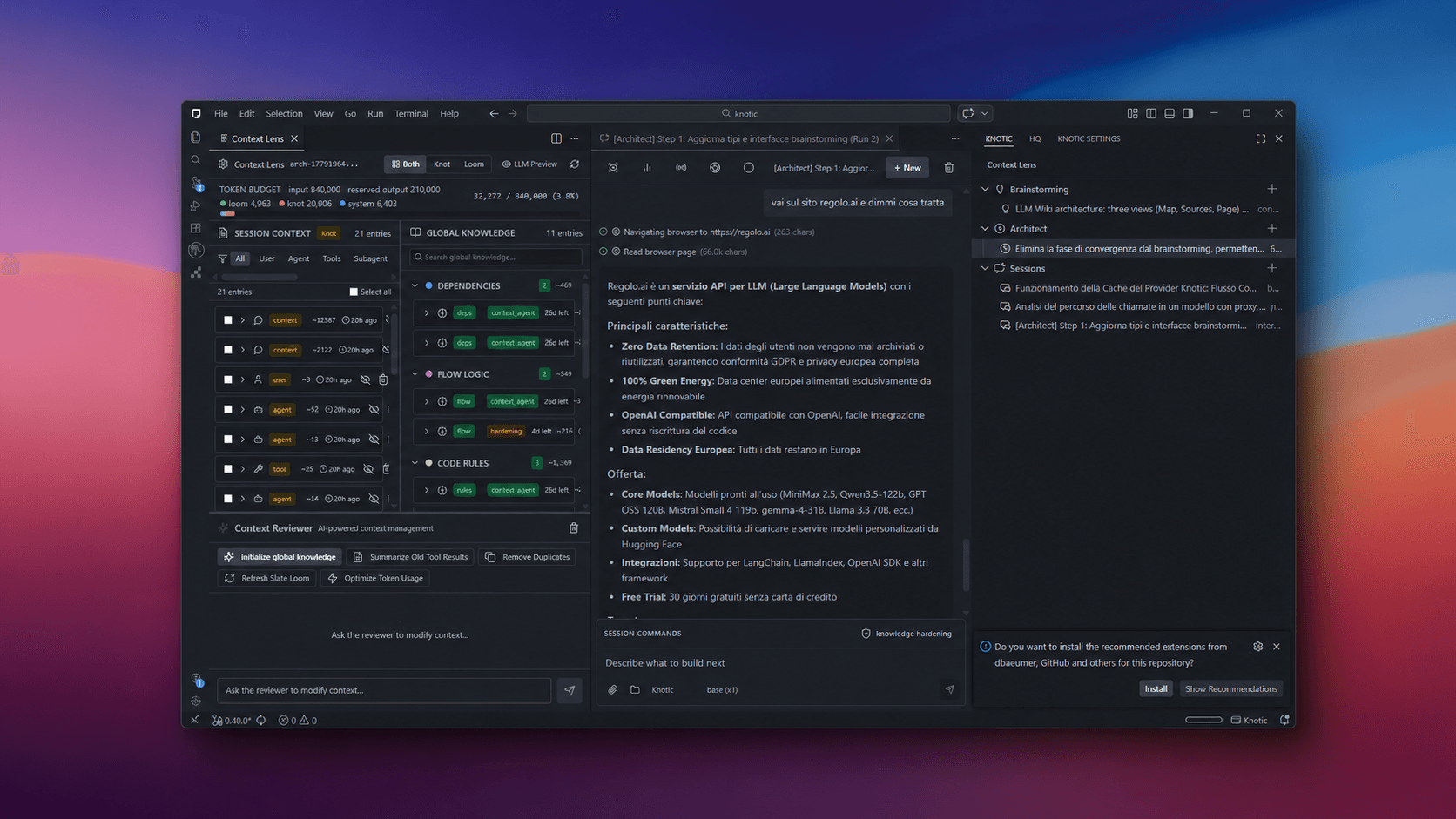
Supporting capabilities
These capabilities are documented in the current product guides. They support technical evaluation; they do not replace your organization’s provider review or policy enforcement.
Use your own credentials for documented cloud providers instead of relying only on managed inference.
Review BYOK options →Keep the selected provider visible in the workflow. Pair configured providers with your internal approval process.
See provider support →Point Knotic to a local OpenAI-compatible endpoint when a local runtime fits the team’s technical requirements.
Read the privacy-first guide →Project knowledge, session context, and reusable skills are stored under the repository’s .knotic directory.
See how sessions work →HQ Monitoring provides activity and usage signals for reviewing how the runtime is being used.
Explore HQ Monitoring →AI Coding Data-Minimization Checklist
Use this checklist to structure a technical workshop with Engineering, Platform, Security, and Privacy stakeholders.
Request the checklistThe request opens a pre-filled contact form. No download is implied.
01
02
03
04
05
06
Good fit / Not yet a fit
Evaluation questions
No. Knotic provides operational controls for engineering workflows. It does not certify compliance, provide legal or healthcare advice, or replace your organization’s formal risk assessment.
Yes. Knotic documents a local provider mode for OpenAI-compatible endpoints. Whether a specific local deployment satisfies your security, privacy, performance, or regulatory requirements requires your own technical review.
Yes. Context Lens lets developers inspect project and session context, preview prepared context blocks, and hide or remove entries before returning to the working session.
Core project memory and reusable skills are stored in the workspace under .knotic, so they can remain with the repository and follow its review and access practices. Provider-bound requests still follow the selected runtime path.
Start with a non-production repository, generic configuration placeholders, and purpose-built fixtures that contain no personal or health information. Test inspection, removal, provider selection, and monitoring before expanding the evaluation scope.
Start without sensitive data
Begin with a sanitized repository and purpose-built fixtures. Map what enters the payload, who selects the provider, and what evidence the team can review afterward.
Read the technical Context Lens documentation →