
Comparison — Knotic vs Cursor
Knotic vs Cursor: when team governance beats individual speed
Cursor is the best AI coding assistant for individual developers. Knotic is built for when that developer is part of a team that needs to share context, control providers, and see exactly how much each call costs.
TL;DR
If you're a solo developer or a small team optimizing for autocomplete speed and tab-completion. Cursor is still unbeatable there.
If your team re-explains the same context to the model every day, you need to see what you send before you send it, or you want to switch providers without rewriting workflows.
No. They are different AI IDE philosophies. Cursor optimizes for the individual; Knotic optimizes for the team.
Honest take
When Cursor is the right choice
Cursor has the best tab-completion and inline edit on the market. The latency from keystroke to suggestion is the benchmark every other AI IDE is measured against. Knotic does not compete on that metric — and if your primary workflow is rapid accept/reject on single lines, Cursor is the right tool.
If you are a solo developer or a team of fewer than five people working on disjoint parts of the codebase, the knowledge-sharing layer that Knotic provides is overhead you do not need yet. Cursor's flat-rate pricing ($20/dev/month for Pro, $40/dev/month for Business) is simpler to budget for small teams.
Cursor's ecosystem — Composer, agent mode, the @-symbol context picker — is more mature for certain exploratory workflows. If you need a polished agent that can read your codebase, edit files, and run terminal commands out of the box, Cursor delivers that today with fewer rough edges.
Use case
When Knotic is the right choice
You have a team of five or more developers working on the same codebase, and you are tired of re-explaining the same architectural decisions, coding conventions, and project context to the AI every session. Knotic treats team memory as a first-class artifact — versioned in Git, reviewable in PRs, composable by domain.
You need to see the actual payload before it reaches the model. Context Lens reconstructs every chunk, tool result, and system instruction the model will receive, and lets you trim noise before sending. For teams with compliance requirements, this is not a nice-to-have — it is the difference between adopting AI coding and blocking it.
You have been bitten by a rate-limit cooldown mid-sprint. Cursor's daily and monthly request caps create arbitrary blockers for teams that hit them during high-velocity periods. Knotic-managed inference consumes credits based on actual usage. The Free plan includes 30 monthly credits, while paid plans start at 9€ for 100 credits — no time windows, no cooldowns.
You want to assign different providers to different roles — Claude for architecture, GPT for code generation, a local GGUF model for code review. Knotic makes provider routing explicit and auditable, not a hidden backend decision.
Feature comparison
Side by side
Tab completion / inline edit speed
Composer / agent mode maturity
Multi-step Architect mode
Repo-versioned team memory (Skills as Code)
Inspectable payload before send (Context Lens)
Per-call cost & token telemetry
Multi-provider BYOK routing
Local model support (GGUF)
Pricing model
Air-gapped / on-prem deployment
VS Code extension compatibility
Deep-dive 1
The rate limit problem nobody talks about
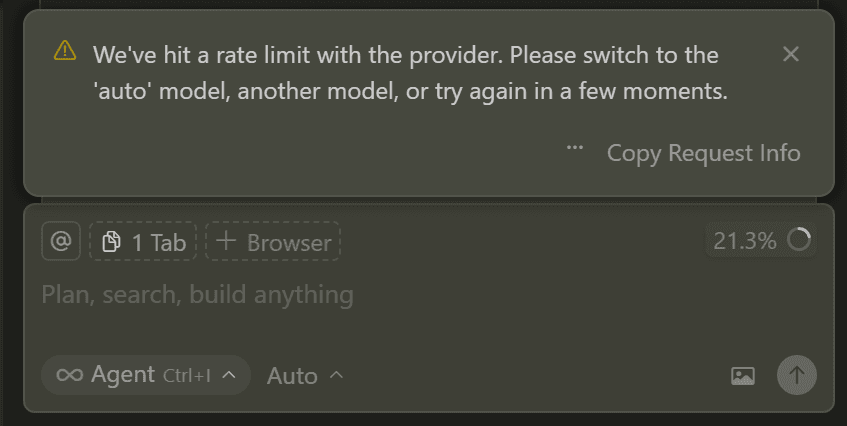
Every AI IDE with a managed backend uses rate limits to protect infrastructure. That is fair. The problem is how they are enforced. Cursor Business gives 500 premium requests per month per developer — a hard cap that resets monthly. Claude Code enforces hourly and daily usage windows with cooldowns that activate unpredictably.
For a solo developer, these limits are rarely an issue. For a team of 15 shipping a sprint, they create a recurring bottleneck. Day 20 of the month: half the team hits the premium cap and drops to slow mode. Mid-afternoon code review: Claude Code refuses a request because the hourly window reset is 12 minutes away.
Knotic-managed inference consumes credits based on actual usage. You choose the plan that fits your team: €0 for 30 monthly credits, 9€/month for 100 credits, 20€ for 300, 40€ for 700, or 100€ for 2000. For teams, there is an enterprise plan at 40€/seat/month with 800 credits per seat (minimum 3 seats). There are no hourly or daily windows, no cooldowns — if you have credits, you can use them.
The practical difference: a team of 10 running a heavy-review day before a release does not need to count requests. They ship, consume credits based on actual usage, and keep moving. No developer's flow is broken by a cooldown timer.
Deep-dive 2
What “team memory” actually means
Cursor Rules live in a single .cursorrules file at the project root. It is a prompt — powerful, but monolithic. One file, one context window, no versioning beyond Git history for the file itself. If two team members edit it in the same week, the last write wins. There is no composition, no scoping, no way to say “use this rule for React components and that rule for API handlers.”
Example
# .knotic/skills/react-components.md
# React Components

Rules for building React components.

- Use function components with named exports.
- One component per file.
- Props go in a .types.ts file.
- Use React.forwardRef for polymorphic components.

# .knotic/skills/api-design.md
# API Design

Rules for REST API endpoints.

- Use @/lib/api-client for all requests.
- Responses must include a `success` field.
- Pagination uses cursor-based keys.
Knotic treats team memory as modular, versionable units called Skills. Each skill is a markdown file in the .knotic/skills/ directory, organized by domain. Skills are reviewed in PRs like any other code change. They can specify different providers, temperatures, and instruction sets per domain. The entire skill directory is checked into Git, so onboarding a new developer means cloning the repo — not emailing them a rules file. A .knot is a chat session that runs inside Knotic, executing skills and maintaining context across messages.
The difference is not feature depth. It is governance. A team with Cursor Rules manages knowledge through a single file that grows unwieldy and has no review process. A team with Knotic manages knowledge through the same workflow they use for source code: branch, PR, review, merge.
Deep-dive 3
Seeing the prompt before you send it
Every modern AI IDE has a context engine that decides what to send to the model. The problem is that what gets sent is often more than what you expect — open editor tabs, recently viewed files, terminal output, retrieved chunks from a vector store, tool results from previous steps. The model sees a composite payload that is invisible to the developer.
This is the black-box problem. You ask a question, the IDE assembles context, the model answers — but you never see what was actually in the prompt. For teams working with proprietary codebases, this is a compliance risk. For everyone else, it is a debugging nightmare when the model hallucinates based on irrelevant context.
Context Lens solves this by reconstructing the full payload — every chunk, tool result, system instruction, and user message — in a structured interface before it is sent. You can inspect the token budget, trim irrelevant files, reorder sections, and see exactly what the model will receive. It turns context assembly from a hidden process into an observable, editable step.
This is not a nice-to-have. It is the single reason some enterprise teams cannot adopt Cursor: the inability to audit what leaves their network. With Context Lens, Knotic closes that gap without sacrificing the convenience of automatic context assembly.
Pricing
Pricing & deployment
Cursor Pro costs $20/dev/month with 500 slow premium requests and unlimited completions. Cursor Business costs $40/dev/month with 500 fast premium requests per month, priority support, and centralized billing. Both enforce hard monthly caps — additional premium requests beyond the quota fall back to slow mode or are blocked.
Knotic uses credit-based pricing, with credits consumed based on actual inference usage. The Free plan includes 30 credits every month; paid plans start at 9€/month for 100 credits and reach 100€/month for 2000 credits. For teams, there is an enterprise plan at 40€/seat/month with 800 credits per seat (minimum 3 seats). There are no time-window caps — if you have credits, you can use them. A team of 10 on a heavy shipping week does not face degraded performance mid-sprint.
On deployment: Cursor is SaaS-only — your code passes through Cursor's backend for every inference request. Knotic supports BYOK providers (bring your own API keys to OpenRouter, Anthropic, OpenAI, GitHub Models), local inference via GGUF models, and air-gapped configurations for compliance-driven environments. If your organization requires on-premise inference, Knotic is the only option between the two.
FAQ
Questions a tech lead asks before switching
The questions that matter are not about features — they are about migration cost, compatibility, and whether the team will actually benefit from a different AI IDE philosophy.
Not with a one-click import, but the migration is straightforward. Cursor Rules are essentially system prompts — the same content can be structured as a skill file (.md) in .knotic/skills/ in Knotic. Each skill is plain markdown with optional frontmatter (provider, temperature) and lives in the repository, versioned like any other file. A .knot is a chat session that executes those skills. For teams with many Rules, the recommendation is to group them by domain (e.g., backend-rules.md, frontend-rules.md) instead of a single .cursorrules file.
Yes, and more. Cursor offers Anthropic (Claude 3.5 Sonnet) and OpenAI (GPT-4o, o1-mini) with internal routing. Knotic exposes an explicit multi-provider runtime: you can use OpenRouter, direct Anthropic, direct OpenAI, GitHub Models, local GGUF providers, and Knotic managed inference — all in the same workspace, with routing assignable per skill or per role. You are not locked into the provider choice Cursor makes for you in the background.
No. Knotic is a fork of VS Code, so 99% of extensions work without changes. Themes, language servers, formatters, debuggers, linters — everything remains the same. The only difference is that the AI panel and navigation system replace Cursor's interface (Ctrl+K, Composer, agent mode) with Knotic's surfaces (HQ, Context Lens, skills). Editor-side extensions continue to work as always.
Yes. Cursor has the fastest tab-completion and inline edit on the market. Knotic does not compete on that metric — our inference model is optimized for team throughput, not single-character latency. If your workflow is driven by tab-complete (rapid accept/reject on single lines), Cursor is still the better choice. Knotic is built for multi-step flows: architecture, planning, structured execution, review. They are different optimizations for different contexts.
Cursor Business costs $40/dev/month with 500 premium requests per month (hard limit, reset monthly). Knotic uses a credit-based model, with credits consumed based on actual inference usage. The Free plan is €0 with 30 credits every month. Paid plans start at 9€/month for 100 credits, 20€ for 300, 40€ for 700, up to 100€ for 2000 credits. For teams, there is an enterprise plan at 40€/seat/month with 800 credits per seat (minimum 3 seats). No time windows, no cooldowns — you use credits at your own pace.
Yes. There is no conflict — both are forks of VS Code and can coexist on different machines. Some beta teams use Cursor for individual developers working on isolated tasks and Knotic for teams collaborating on the same codebase. There is no lock-in: you can migrate gradually, keep Cursor for certain workflows, and move team by team. The .knot and .loom files are text-based and versioned in Git, so there is no dependency on a proprietary backend.
Also compare
More comparisons: Knotic vs Windsurf, Knotic vs Claude Code. Coming soon: Knotic vs Codeium. Check back or join our Discord for updates.
Two ways to begin
Start with one visible, governed workspace.
Download the desktop workspace and complete the guided setup—or map your existing AI coding workflow before a focused team pilot.